Broadcast
Send a promo to people who already chatted with you, on the app they use.
Pick where to send from, pick who gets it, check how many people that is, then send now or schedule it.
Product screens are in Indonesian and show sample data.
Four steps, and nothing sends before you review.
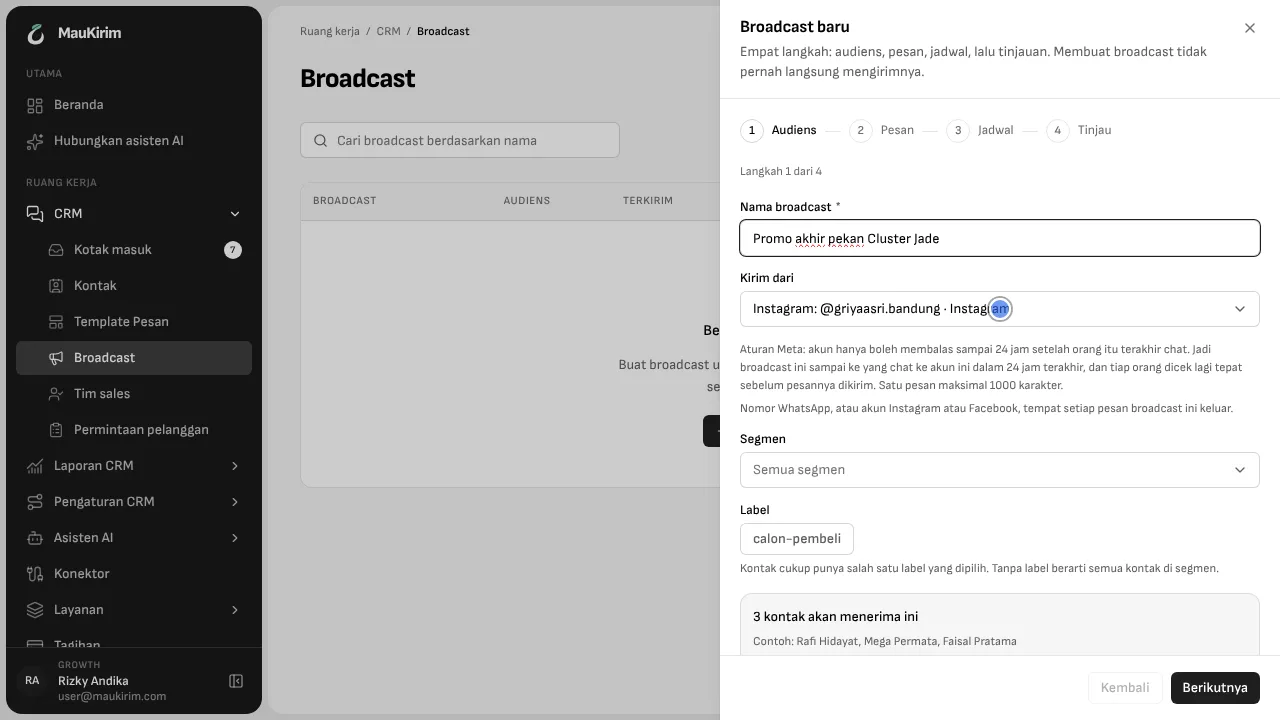
The steps are audience, message, schedule, review. Creating a broadcast never sends it right away. Before you continue, MauKirim tells you how many contacts will receive it and shows a few names as examples.
On WhatsApp, only people who agreed to hear from you.
Promo messages on WhatsApp reach only contacts who gave permission to receive promotions. Pick the sending number, pick a customer group or label, and send.
On Instagram and Facebook, people who chatted in the last 24 hours.
Meta only lets an account reply within 24 hours of the person's last message. So a broadcast here reaches people who chatted with you in the last 24 hours, and each person is checked again right before their message goes out. One message is at most 1,000 characters.
You can see what happened.
After sending, you see how many were delivered, how many failed, and how many were skipped because the 24 hours had passed. Message templates can be reused for the next broadcast.
Comments on your posts get answered too.
Comment rules reply publicly to comments on an Instagram or Facebook post, then continue by DM. If someone comments “price” on your post, they get a reply in the comments and the details in a DM.
Good to know
- On Instagram and Facebook you cannot message people who never chatted with you, or people past the 24 hours. That is Meta's rule.
- “Read” status exists on WhatsApp, not yet on Instagram and Facebook.
- A private reply to a comment can only contain text.
Frequently asked questions
Can I broadcast to all my Instagram followers?
No. Meta only allows messages to accounts that chatted with you in the last 24 hours.
Can I schedule a broadcast?
Yes. Pick the time in the Schedule step, or send right away.
Keep reading